
Private Blog Networks (PBN)
The Ultimate Guide to Private Blog Networks
Master the art of controlled link equity. PBNs allow you to bypass the uncertainty of organic outreach by building your own ranking assets.
A Private Blog Network (PBN) is a collection of high-authority websites that you own and control. Their sole purpose is to link to your main “money site” to boost its rankings in search engines. By leveraging the existing history, age, and backlinks of expired domains, PBNs allow you to manufacture authority on demand.
However, with great power comes great risk. This guide breaks down exactly how to build, manage, and leverage a network without leaving footprints that search engines can track.
Get our PBN LinksAUTHORITY FLOW TOPOLOGY
FLOW
PBN
Network Site A
Source: Expired Domain (DR 32)
PBN
Network Site B
Source: Auction Domain (DR 45)
PBN
Network Site C
Source: Closeout Domain (DR 28)
$$$
Your Money Site
Status: Authority Recipient
INPUT: HIGH DR ASSETS
OUTPUT: #1 RANKINGS
Definition
What is a PBN?
A Private Blog Network (PBN) is a collection of high-authority websites that you own and control. These domains—usually acquired because they have existing trust and backlinks from major publications—are used to link back to your primary website (“money site”) to pass authority and improve search rankings.
The Mechanics
Why PBNs Work
PBNs capture the raw link authority of expired domains and refine it into a perfect ranking signal that ties directly to your money site(s).
INPUT: Link Equity
→
PROCESSING NODE
PBN DOMAIN
Signal Encapsulation Engine
Topical Realignment
History Preservation
OBL Control
→
OUTPUT: RANKING SIGNAL
YOUR MONEY SITE
#1
Search Visibility
1. Relevance / Topical Alignment
Since you own the domain, you can make it as relevant to your niche as you want, while still keeping the inherent theme of the domain in mind.
2. Contextuality
You control the narrative and exactly where your link is placed. Ideally, this is a contextual link placed directly on the homepage for maximum visibility.
3. OBL Control
You control the Outbound Links (OBL). No link equity is diluted by thousands of other links or fragmented by spammy neighbors.
4. Inherent Authority
If you choose the right domain, you inherit decades of site authority, age, and trust history that a new domain simply cannot replicate.
5. Waterfall Effects
If you place the link on the homepage of your PBN domain (as you should), you get the “Waterfall Effect” where authority cascades directly from the root to your site.
6. No Link Decay
You control the asset. You can add fresh content or update existing content as you see fit. Your link will never disappear or rot.
7. Continuous History
A good PBN domain has no drops in its history. It maintains a clean, continuous record of existence in Google’s index.
8. No Entity Rot
By repurposing the domain correctly, you prevent the entity from rotting and instead realign its power to support your current business goals.
Footprints
Why footprints are PBNs biggest enemy.
Ah yeah, PBN footprints. The proverbial footprints in the sand that Google uses to identify your PBN. Needless to say, you MUST avoid these to stay under the radar. And we start with the biggest footprint of them all: the hosting.
Footprint #1
The PBN Hosting
I’ll just say it, hosting is the bread and butter of any PBN. Where and how you host your PBN domains is probably THE most important step when building your PBN. In our view, the best solution is cloud hosting.
It’s all about IP diversity. Hosting multiple PBN domains on the same C or D-class clusters creates a noticeable footprint. We need one unique IP address for each PBN site.
- PBN A on IP 145.132.13.94
- PBN B on IP 65.62.209.173
- PBN C on IP 49.42.219.174
Cloud hosting (Digital Ocean/Vultr) offers this diversity with zero footprints. Avoid “Cheap PBN Hosting” companies where you share IPs with spam sites.
IP DIVERSITY CHECK
Unique Droplet Config
145.132.13.94
✓ UNIQUE (NY)
65.62.209.173
✓ UNIQUE (LON)
49.42.219.174
✓ UNIQUE (FRA)
49.125.39.92
⚠ SHARED IP
Footprint #2
Registrars
While using only one registrar for all your PBN domains is not a footprint in itself, it can’t hurt to diversify. You can save a lot of money by spreading your PBN domains over several registrars, as all of them run different promos throughout the year.
Our top choices are:
- Dynadot.com
- Namecheap.com
- Godaddy.com
- Name.com
- Namesilo.com
- Network Solutions
REGISTRAR MIX
Site A: NameCheap
OK
Site B: GoDaddy
OK
Site C: Dynadot
OK
Site D: NameSilo
OK
DIVERSITY SCORE: 100%
Footprint #3
Whois Privacy
With the implementation of GDPR, domain privacy has become a standard feature rather than a luxury. Most registrars now offer private WHOIS protection for free.
This means having private WHOIS enabled on all your PBN domains is no longer a detectable footprint. It is now universally accessible and expected.
WHOIS LOOKUP TOOL
> QUERY: WHOIS DOMAIN.COM
Registrant Name: REDACTED FOR PRIVACY
Registrant Org: Privacy Guardian
Admin Email: [email protected]
> STATUS: SECURE
Footprint #4
Nameservers
All the cloud hosting providers (DO/Vultr) offer their own nameservers that you can use. For example Digital Ocean has the following:
- ns1.digitalocean.com
- ns2.digitalocean.com
- ns3.digitalocean.com
By using these common nameservers you will blend in with 500k+ of other websites. Do not use custom nameservers like ns1.pbndomain.com, as those leave a massive footprint.
DNS CONFIGURATION
NS1 Record
ns1.digitalocean.com
NS2 Record
ns2.digitalocean.com
✓ BLENDS WITH 500,000+ SITES
Footprint #5
Blocking Bots
Many people like to block web crawlers like Ahrefs or Majestic, fearing people may find their PBN. But think about it rationally: how many real websites do this? Not too many.
In our opinion actively blocking bots via plugins like SpiderBlocker is the actual footprint here. Why would you actively try to block out crawlers when over 90% of the net doesn’t?
ROBOTS.TXT ANALYZER
DETECTION RISK DETECTED
User-agent: AhrefsBot
Disallow: /
Disallow: /
“Blocking bots creates a unique fingerprint that screams PBN.”
Footprint #6
Forgetting to Rebuild Inner Pages
To make the most out of your PBN domains, you want to rebuild the internal pages that have valuable links pointed to them. You must re-create them with the exact same URL structure.
If the old page was /blog/how-to-fix-a-pipe/, you must create a new page with that exact slug. We like to add fresh content to those new pages using AI.
LINK JUICE RECOVERY
OLD: /blog/post-1
➜
NEW: /blog/post-1
STATUS: 404 ERROR FIXED
LINK EQUITY: RESTORED
LINK EQUITY: RESTORED
Footprint #7
Customize Your PBN
Whatever you do, make sure that your PBN site looks like a real website. You want to avoid the typical “PBN look”: An ugly free theme, default sidebars, no logo, no menu. It’s a dead giveaway.
All of your PBN sites should have unique layouts, with different stock images, different categories, and URL structures. Use themes like Astra, Blocksy, or GeneratePress.
THEME AUDIT
DEFAULT THEME
(Risky)
(Risky)
CUSTOM LOGO
(Safe)
(Safe)
NO MENU
(Risky)
(Risky)
UNIQUE CSS
(Safe)
(Safe)
Footprint #8
Not Building Links to Your PBNs
Real websites gain and lose links all the time. It’s a natural process. As such, we highly recommend building a few links to your PBNs.
Not only can this increase your rankings by passing more link equity through the PBN to your site, it also creates a natural link velocity for your PBN domain. This eliminates a major dormancy footprint.
LINK VELOCITY
NATURAL GROWTH SIGNAL DETECTED
Footprint #9
Using GA or Search Console
We don’t want Google to know about our PBN. So it would be completely idiotic to use any service offered by Google on our PBN sites.
We don’t need analytics, we don’t need search console insights. It’s a PBN, it’s just there for links. Data is not imperative. Maybe a bit too much paranoia? Who knows.
TRACKING BLOCKER
Google Analytics
Search Console
DO NOT INSTALL
Footprint #10
No Legal Pages / Cookies / Contact
In times of GDPR, all real websites need a proper privacy policy and terms of service page. Your PBN site is no exception. Use a free generator like WP Autoterms.
Your site should also have an active cookie banner and a good contact page with at least 200-300 words. Don’t forget the “About Us” page—use random names and sufficient content.
LEGITIMACY CHECKLIST
Privacy Policy [x]
Cookie Banner [x]
Contact Page [x]
About Us [x]
Footprint #11
Internal Linking
Internal linking is huge. Real sites use it to let link equity flow freely through the website. It is one of the most overlooked techniques in SEO to create topical relevance.
Add them! To any inner pages of your PBN site, the homepage, posts, the about us page, etc. Let the link equity flow.
EQUITY FLOW MAP
HOME
POST
ABOUT
STRUCTURE: INTERCONNECTED
ISLAND PAGES: 0
ISLAND PAGES: 0
Footprints #12 – #14
Images, Cloudflare & SSL
- Images: Don’t steal images. Use Pixabay or Pexels to avoid legal footprints.
- Cloudflare: Avoid using it on every site. It creates a pattern. If you use Cloud Hosting (Vultr), you don’t need it.
- SSL: Essential. Use free Let’s Encrypt certificates. Sites without SSL look abandoned.
TECH STACK AUDIT
Stock Images
SAFE
Direct DNS (No CF)
SAFE
SSL (HTTPS)
ACTIVE
Footprint #15
Root vs. WWW Version
It’s essential to consolidate links and authority to a single version of your domain. Some domains accumulate more backlinks to the root version, others to www.
Identify the version with more authority links and set up a 301 redirect. Without this, you split your link equity.
.HTACCESS CONFIG
# Redirect WWW to Root
RewriteEngine On
RewriteRule ^(.*)$ https://site.com/$1 [R=301]
RewriteEngine On
RewriteRule ^(.*)$ https://site.com/$1 [R=301]
EQUITY CONSOLIDATED
Footprint #16
Interlinking Your PBN Domains
Do not link your PBN sites to one another under any circumstances.
Interlinking creates a detectable network pattern. Search engines use algorithms to identify these relationships. Each site should function as an independent entity with no visible connections.
NETWORK ISOLATION
PBN A
PBN B
PBN C
LINK DETECTED!
NETWORK COMPROMISED
NETWORK COMPROMISED
Footprint #17 & #18
Maintenance & Author Profiles
Maintenance: Keep themes/plugins updated. Hacked PBNs are useless. Install Wordfence.
Author Profiles: Develop unique author personas. Use AI to generate bio photos. Use plugins like Simple Author Box to add credibility. A site without an author looks fake.
PERSONA GENERATOR
John Doe
Expert in [Niche]
PLUGIN: Simple Author Box
STATUS: INSTALLED
STATUS: INSTALLED
There we have it. Those are the biggest 18 footprints we could think of. If we missed any, please leave a comment below.
Next, let’s get into linking out from your PBN to your money site.
Linking OUT
How to link out from a PBN
Two schools of thought: Concentrated power vs. Budget efficiency.
The Sniper
Option 1: OBL = 1
Each PBN site links to exactly one money site.
+ Power
100% of link equity is passed to the target. No dilution.
+ Safety
Zero interlinking footprints between your money sites.
– Cost
Expensive. Requires a unique domain for every project.
PBN Site
Money Site
The Shotgun
Option 2: OBL > 1
One PBN site links to multiple money sites.
+ Efficiency
One strong domain supports your entire portfolio.
– Dilution
Power is split. 3 links = ~33% equity per site.
– Risk
Creates a shared footprint. If the PBN dies, all 3 sites lose power.
PBN Site
Site A
Site B
Site C
Finding PBN Domains
Where to find PBN Domains
If you don’t want to use a domain vendor (like us), you can use ExpiredDomains.net. It’s a free database, but you need to understand the four stages of a dying domain to find the gems.
01
Highest Quality
Domain Auctions
Domains haven’t expired yet. They retain their original registration age. This is where the best domains live.
Browse Auctions ↗02
Best Value
Closeouts
Unsold auction domains move here. Prices drop daily over a 5-day period. Sweet spot for budget PBNs.
Browse Closeouts ↗03
Competitive
Pending Delete
Registry purges the domain. Must use a Dropcatch service to snatch it milliseconds after release.
View Drop List ↗04
Low Quality
Deleted Domains
Domain was deleted. Available for standard reg fee (~$10). Mostly spam, but patience reveals gems.
Browse Deleted ↗or… buy a domain from us
Skip the auction wars. We have vetted domains ready to transfer.
Only real heavy hitters, ready to be deployed as a high-end PBN.
offprintlondon.com
$2,999
DR29
RD150
DA61
TF9
Authority Links
Time, Vogue (IT), Wallpaper, The Art Newspaper, LensCulture…
💡 Use Case
Perfect for an art studio, gallery, or creative agency targeting London.
globalexplorers.org
$1,595
DR19
RD221
DA32
TF9
Authority Links
Doi.gov, Denverpost, USU.edu, Washingtonian, KPBS.org…
💡 Use Case
Turn into a travel + eco-climate authority, leveraging gov/edu links.
manufactureny.org
$2,599
DR28
RD312
DA41
TF7
Authority Links
Aljazeera, Wired, Vice, Huffpost, Inc.com, Fastcompany…
💡 Use Case
Tech meets couture. Build a directory for NY-made goods & shops.
The In-DEPTH CHECK
How to analyze a PBN domain
Now let’s say, that you have found a domain that looks decent on paper. Now you have to do the extra checks to make sure it’s actually good. One mistake here can tank your entire network.
STEP 01
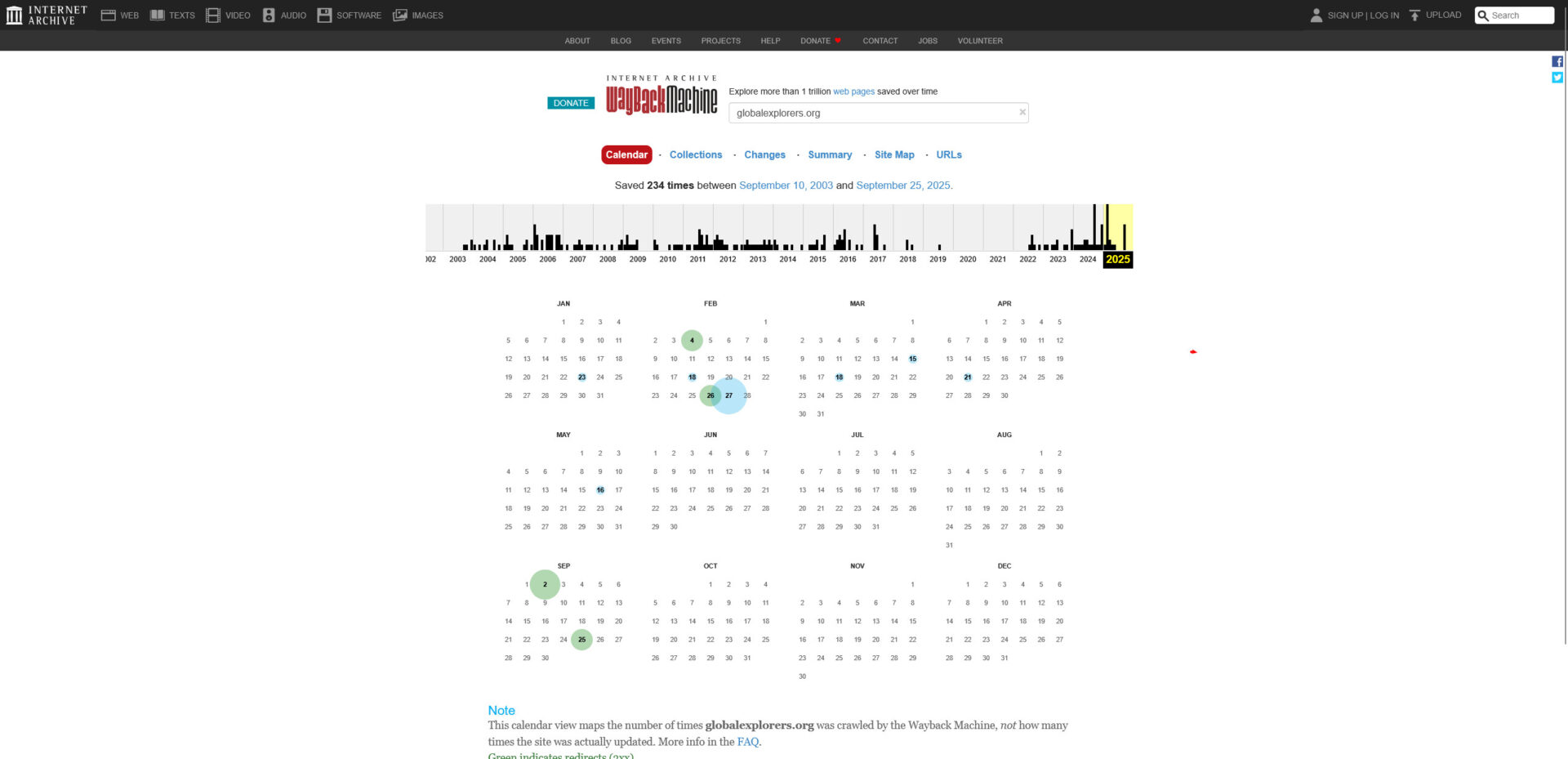
Check Archive.org
To ensure you get a PBN domain with a clean history, it’s important to verify that it has never been associated with any unwanted spam, adult content, gambling sites, or excessive redirects (301s).
The easiest way to do that is using the Wayback Machine. It captures snapshots of websites throughout their existence. A healthy domain will show a consistent history of legitimate use.
Pro Tip: Click through the timeline circles. If a travel blog suddenly turned into a Chinese sneaker shop for 6 months, avoid it.
STEP 02
Check Trademarks
Nothing is worse than building a site and receiving a Cease & Desist letter a month later. You must ensure the domain name isn’t infringing on active trademarks.
Check the registry corresponding to the TLD (.com, .co.uk, .de, etc.):
LEGAL SCANNER
🇺🇸 US Database CLEAN
🇬🇧 UK Database CLEAN
🇪🇺 EU Database CLEAN
Scan Complete: 0 Conflicts
STEP 03
The Ahrefs Audit
We use Ahrefs to qualify the power of the domain. Before you buy, check the metrics against a solid baseline. Here is an example of a Premium Domain we recently vetted:
globalexplorers.org
VERIFIED
Price $1,595
Domain Rating DR 19
Ref. Domains 221
Top Link DOI.gov
Use Case: Turn into a travel + eco-climate authority, leveraging existing gov and academic links (DOI.gov, USU.edu, KPBS).
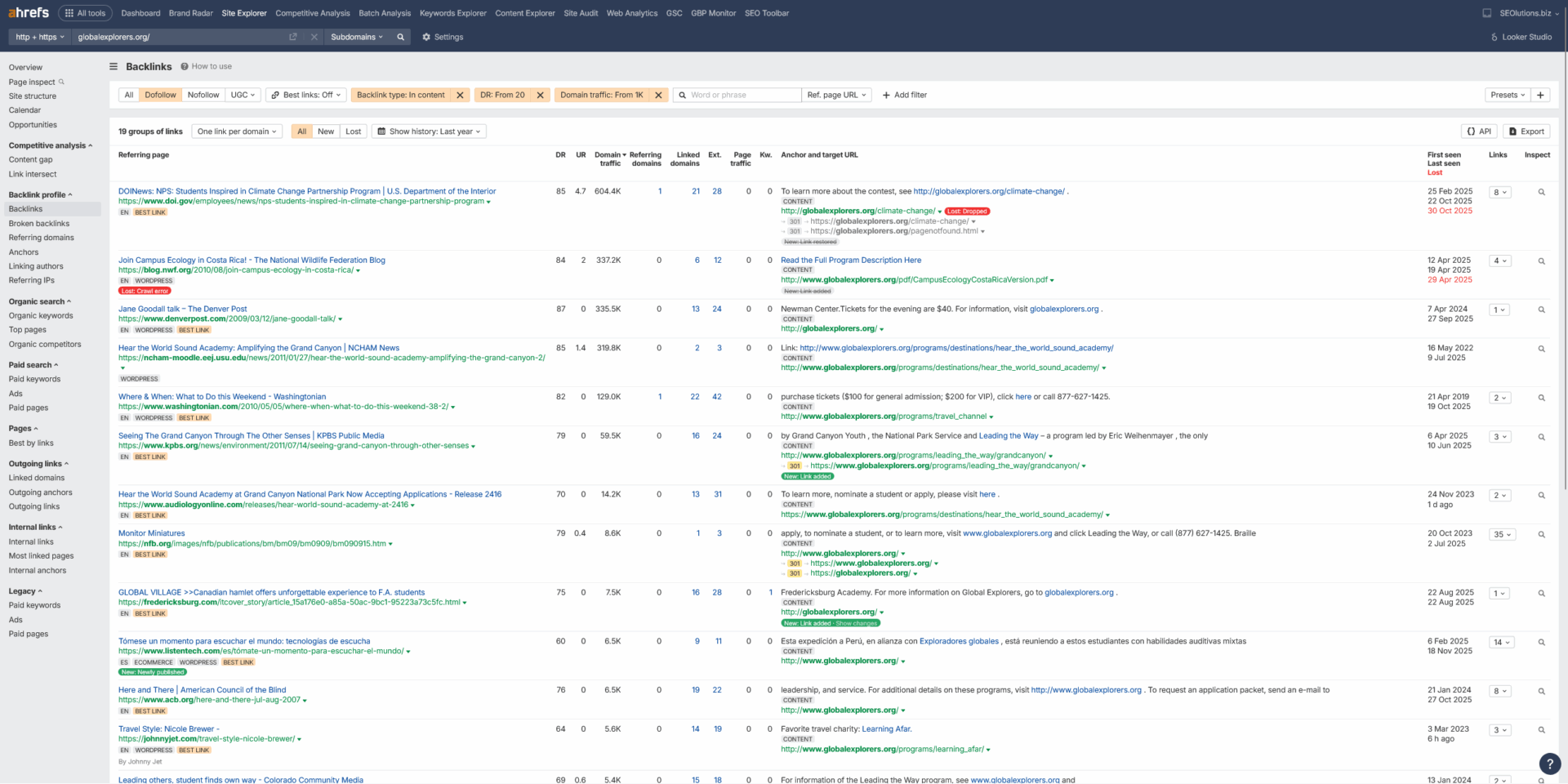
A. Check Link Profile
Plug the domain into Site Explorer and go to Backlinks. You need to filter out the noise to see the real power.
- Filter: DoFollow Only
- Filter: DR > 20 (We want authority)
- Filter: Traffic > 1,000 (Real sites have traffic)
- Filter: Type: “In Content” (Contextual links pass the most juice)
Sort by Traffic and check the links. You want to see some heavy hitters here (see screenshot for an example). But in general, if you see 10+ links remaining after these filters, you are off to a great start.
B. Check “Best By Links”
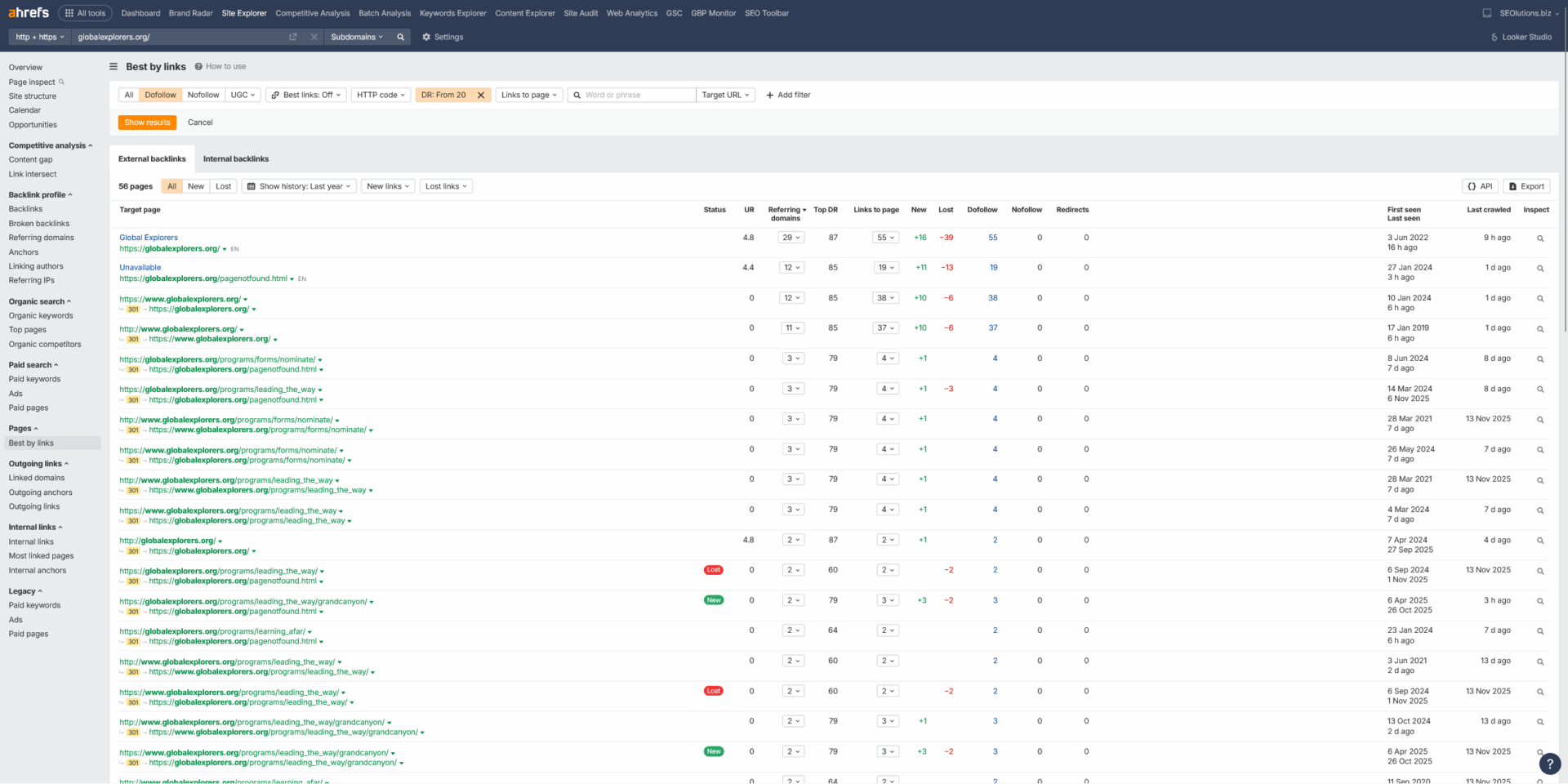
Go to Pages > Best by Links. This tells you where the link equity is flowing.
Ideally, you want to see the majority of links pointing to the Homepage (root or www) or at most 3-5 inner pages.
Why? If links are scattered across 500 different dead blog posts, you will have a nightmare trying to recreate or redirect them all. A centralized equity funnel is much easier to manage.
C. Check Anchors
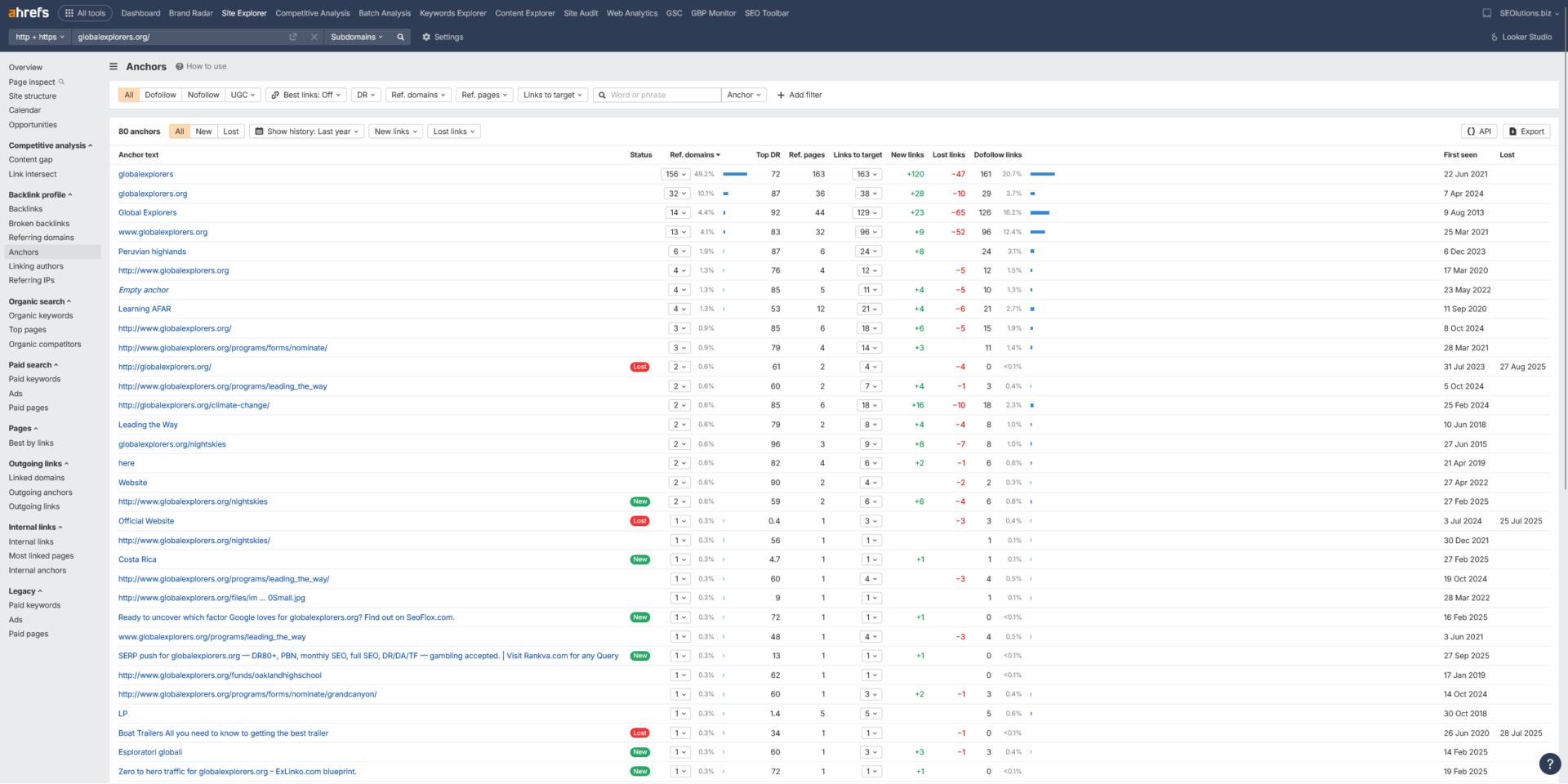
Go to Backlink Profile > Anchors. This reveals how previous owners built links.
You want a healthy, natural profile. This means:
- Mostly Branded anchors (e.g., “Global Explorers”).
- Naked URLs (e.g., “globalexplorers.org”).
- Low Exact Match keywords.
Red Flag: If you see anchors like “buy cialis,” “online casino,” or foreign text, the domain is burned. Do not buy it.

The Blueprint
Step-by-Step Build Guide
This is the exact process we use to build high-power assets. It eliminates footprints by using real cloud infrastructure and randomized tech stacks.
STEP 01
Secure Cloud Hosting
The foundation of a safe PBN is the IP address. Cheap “SEO Hosting” packs 500 spam sites onto one IP. Cloud hosting puts you next to legitimate businesses like Uber or Slack.
We use DigitalOcean and Vultr because they offer “One-Click WordPress” installations. You get a unique IP address for $4-$6/month.
Remember: 1 Domain = 1 Server (Droplet).
STEP 02
Rapid Design
Your goal is “Minimum Viable Legitimacy.” The site must look expensive, but it shouldn’t take you days to build. Do not use default themes like “Twenty Twenty-Four” as they are a footprint when used en masse.
The Workflow:
- Install Elementor (Free or Pro).
- Install Envato Elements plugin.
- Import a “Template Kit” relevant to the niche (e.g., “Dental Clinic” or “Tech Blog”).
- Customize the logo and footer. Done in 30 mins.
Envato Elements
Import Template Kit
STEP 03
Topical Content
You need to bridge the gap between the domain’s history and your money site’s niche. Use modern LLMs to generate high-quality content that reads naturally.
Tools to use:
Claude Code, ChatGPT, or Gemini 3.
Mandatory Pages:
You must include an About Us, Contact, and Privacy Policy page. Google checks for these to verify legitimacy.
PROMPT EXAMPLE
“Write a 1,000 word article about ‘The Future of Sustainable Travel’. Adopt the tone of an experienced travel journalist. Include 3 headers and a conclusion.”
STEP 04
Point the Domain
Once your WordPress droplet is running, you will have an IP address (e.g., 142.93.12.xx). You need to connect your domain to this server.
Log in to your domain registrar (Namecheap, etc.) and edit the DNS records. Create an A Record pointing to your server’s IP.
| Type | Host | Value | TTL |
|---|---|---|---|
| A Record | @ | 142.93.12.xx | Automatic |
| CNAME | www | yourdomain.com | Automatic |
STEP 05
Maintenance & OBL
A PBN loses power if it looks abandoned. You need to keep the “heartbeat” alive.
- Fresh Content: Post 1 new article every 30-60 days.
- Low OBL: Keep Outbound Links (OBL) low. Do not turn your site into a link farm. Keep it as low as you can.
- Updates: Keep plugins updated to avoid hacks.
✅ Status: Indexed
✅ OBL Count: 1 (Safe)
Last Post: 12 Days ago
STEP 06
Power Up (Tier 2)
Your PBN is an asset. Treat it like one. To keep its metrics (DR/DA) high and traffic flowing, you should build links to your PBN.
Send cheap guest posts, niche edits, or high performance links to your PBNs (keep it to the root only). Fresh links = no decay = consistent authority flow.
TIER 2 LINKS
⬇
PBN DOMAIN
⬇
MONEY SITE
Experimental Route
Alternative Hosting: Netflify/Vercel + AI Built Sites
We are currently testing a new method that costs $0 in hosting fees and leaves zero footprints. Instead of WordPress, we use AI to code static sites or sites in react/next and host them via Github on Netlify or Vercel. IP footprint is almost non existent and setup is fast af.
The Workflow
1. Code it: Use tools like Claude Code + Cursor, AI Studio or even Lovable/Bolt to generate a full HTML/CSS/JS websites or react/next sites.
2. Host it: Push the code to GitHub and deploy it on Netlify or Vercel FOR FREE. It’s actually crazy. Most of these PBNs will never get enought raffic to need paid hosting. Deployment is easy. Pushing updates can be done with a few clicks.
Why do this?
From our testing, we have found no footprints so far (!). It is extremely fast, mobile-friendly by default, and basically unhackable. Unless you desperately need the CMS features of WordPress, this is a superior, modern option to host and build your PBNs.
Live Example
The End Result
This example site was built using the AI / Static HTML method mentioned above. It loads instantly and looks like a legitimate brand.

Founder & Admin
View Full Profile →
Janis Thies
Hi, I’m Janis. I’ve been dabbling in SEO & link building since the good old days of WickedFire & WaFo. I focus purely on link acquisition and authority building—no fluff, just results.
Focus
Link Acquisition & Authority
Clients
Agencies, Affiliates, SaaS
Operations
100% In-House Outreach
Mission
Ranking where others can’t.